> For the complete documentation index, see [llms.txt](https://book.bsdcn.org/llms.txt). Markdown versions of documentation pages are available by appending `.md` to page URLs; this page is available as [Markdown](https://book.bsdcn.org/di-18-zhang-xi-tong-guan-li/di-18.9-jie-live-jing-xiang-yu-xi-tong-hui-fu.md).
# 18.9 Live 镜像与系统恢复
## 系统恢复方法概述
FreeBSD 系统恢复可根据故障严重程度选择不同的方法,按侵入性从低到高排列如下:
| 方法 | 适用场景 | 说明 |
| ----------------------- | ------------------------- | ------------------------------------------------------------------------------------------------------------- |
| 单用户模式(Single-User Mode) | 配置文件错误、忘记 root 密码 | 系统启动至单用户模式,仅挂载根文件系统(**/**),不启动网络服务和多用户环境,以 root 权限运行。开机按 2 进入 `single user` 模式,默认无需输入密码,可使用 `passwd` 命令重置密码。 |
| Live 镜像启动 | 引导加载器损坏、根文件系统严重损坏、磁盘分区表丢失 | 从安装介质(U 盘或光盘)启动完整的 FreeBSD 运行环境,不依赖硬盘上的系统。Live 环境提供了完整的工具链,可执行文件系统检查(`fsck`)、ZFS 池导入(`zpool import`)、数据备份等操作。 |
| 灾难恢复 | 整个存储子系统不可用 | 需要依赖预先创建的备份(如 ZFS 快照的远程复制、`dump`/`restore` 备份)重建系统。此场景超出本节范围。 |
## UFS 文件系统下的系统恢复操作
将根 UFS 文件系统挂载为可写:
```sh
# mount -u /
```
挂载所有 UFS 文件系统:
```sh
# mount -a -t ufs
```
## ZFS 文件系统
> **技巧**
>
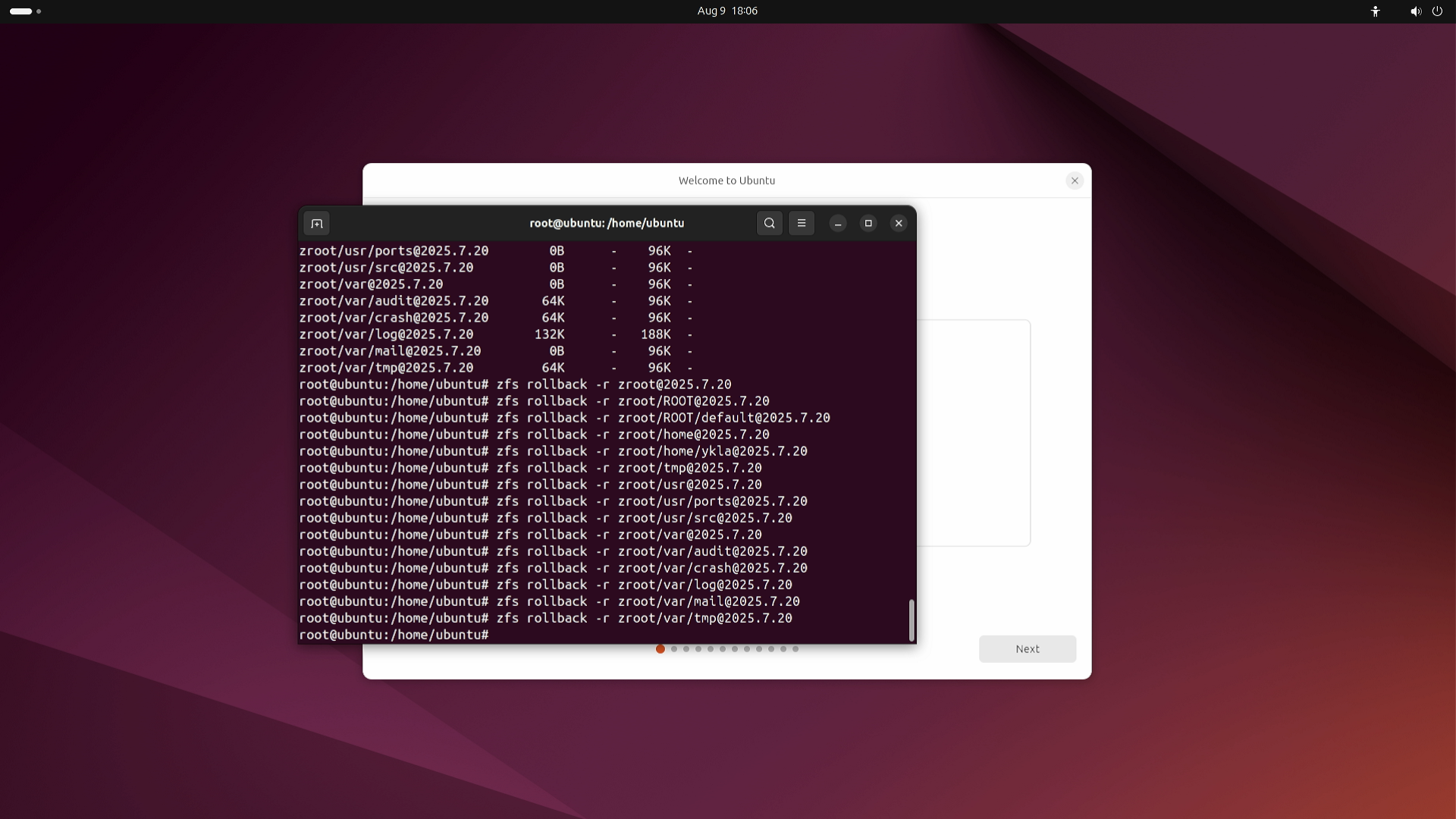
> 在某些情况下,FreeBSD Live 镜像对 ZFS 磁盘的操作可能受限,例如无法创建挂载点或修改为可写模式。此类限制通常与 Live 镜像的默认配置有关。
>
> 如遇此类问题,可尝试使用 Ubuntu 24.04 或更高版本的 Live 模式操作 ZFS 磁盘,例如还原快照等。
>
>  将根文件系统挂载为可写:
```sh
# mount -u /
```
挂载所有 ZFS 文件系统:
```sh
# zfs mount -a
```
挂载 ZFS 根文件系统:
```sh
# zpool import -fR /mnt zroot
```
参数说明:
* `-f`:强制导入(force)。
* `-R`:指定备用根目录(altroot)。
组合使用 `zpool import -fR /mnt zroot` 可将 zroot 池强制导入至 **/mnt** 作为备用根目录。
### 故障排除与未竟事宜
#### `passwd: pam_chauthtok(): Error in service module`
请检查 ZFS 文件系统是否处于只读状态:
```sh
# zfs get all | grep readonly
```
解除 ZFS 文件系统只读属性:
```sh
# zfs set readonly=off zroot
```
#### 参考文献
* OpenZFS. one ZFS file system always starts with readonly=on temporary on boot\[EB/OL]. \[2026-03-26]. . 报告 ZFS 文件系统启动时临时以只读模式挂载的问题及社区讨论。
## 使用 U 盘设备
将指定 U 盘分区挂载到 **/mnt** 并以读写模式访问:
```sh
# mount -o rw /dev/adaXpN /mnt
```
参数说明:
* 可通过 `dmesg` 命令查看设备信息以确定 `ada` 后的具体编号。
* `X`、`N` 的参数取决于具体设备编号。
## 课后习题
1. 进入单用户模式后,分别对 UFS 和 ZFS 文件系统执行 root 密码重置操作,比较两种文件系统在只读挂载与读写重新挂载方面的差异。
2. 分析 FreeBSD Live 镜像生成脚本(**release/**),评估使其支持持久化挂载所需的修改范围与技术难度。
3. 单用户模式通过绕过认证直接授予 root Shell 权限,这是一种有意为之的安全“后门”。比较这种恢复机制与 Linux 的 `init=/bin/bash` 内核参数在安全设计上的差异,并分析系统恢复便捷性与物理安全防护之间的不可调和矛盾。
---
# Agent Instructions
This documentation is published with GitBook. GitBook is the documentation platform designed so that both humans and AI agents can read, navigate, and reason over technical content effectively. Learn more at gitbook.com.
## Querying This Documentation
If you need additional information that is not directly available in this page, you can query the documentation by asking a question.
Perform an HTTP GET request on the following URL with the `ask` and `goal` query parameters:
```
GET https://book.bsdcn.org/di-18-zhang-xi-tong-guan-li/di-18.9-jie-live-jing-xiang-yu-xi-tong-hui-fu.md?ask=&goal=
```
`ask` is the immediate question: it should be specific, self-contained, and written in natural language.
`goal` is what the user is ultimately trying to achieve, the reason they need the answer. Sharing it helps GitBook give you a better, more relevant answer. A goal is most helpful when it describes the outcome the user wants rather than restating the question. For example, with `ask=how do I create an API token`, a goal like `automate deployments from our CI pipeline` lets GitBook tailor the answer to that use case.
The response will contain a direct answer to the question and relevant excerpts and sources from the documentation.
Use this mechanism when the answer is not explicitly present in the current page, you need clarification or additional context, or you want to retrieve related documentation sections.
将根文件系统挂载为可写:
```sh
# mount -u /
```
挂载所有 ZFS 文件系统:
```sh
# zfs mount -a
```
挂载 ZFS 根文件系统:
```sh
# zpool import -fR /mnt zroot
```
参数说明:
* `-f`:强制导入(force)。
* `-R`:指定备用根目录(altroot)。
组合使用 `zpool import -fR /mnt zroot` 可将 zroot 池强制导入至 **/mnt** 作为备用根目录。
### 故障排除与未竟事宜
#### `passwd: pam_chauthtok(): Error in service module`
请检查 ZFS 文件系统是否处于只读状态:
```sh
# zfs get all | grep readonly
```
解除 ZFS 文件系统只读属性:
```sh
# zfs set readonly=off zroot
```
#### 参考文献
* OpenZFS. one ZFS file system always starts with readonly=on temporary on boot\[EB/OL]. \[2026-03-26]. . 报告 ZFS 文件系统启动时临时以只读模式挂载的问题及社区讨论。
## 使用 U 盘设备
将指定 U 盘分区挂载到 **/mnt** 并以读写模式访问:
```sh
# mount -o rw /dev/adaXpN /mnt
```
参数说明:
* 可通过 `dmesg` 命令查看设备信息以确定 `ada` 后的具体编号。
* `X`、`N` 的参数取决于具体设备编号。
## 课后习题
1. 进入单用户模式后,分别对 UFS 和 ZFS 文件系统执行 root 密码重置操作,比较两种文件系统在只读挂载与读写重新挂载方面的差异。
2. 分析 FreeBSD Live 镜像生成脚本(**release/**),评估使其支持持久化挂载所需的修改范围与技术难度。
3. 单用户模式通过绕过认证直接授予 root Shell 权限,这是一种有意为之的安全“后门”。比较这种恢复机制与 Linux 的 `init=/bin/bash` 内核参数在安全设计上的差异,并分析系统恢复便捷性与物理安全防护之间的不可调和矛盾。
---
# Agent Instructions
This documentation is published with GitBook. GitBook is the documentation platform designed so that both humans and AI agents can read, navigate, and reason over technical content effectively. Learn more at gitbook.com.
## Querying This Documentation
If you need additional information that is not directly available in this page, you can query the documentation by asking a question.
Perform an HTTP GET request on the following URL with the `ask` and `goal` query parameters:
```
GET https://book.bsdcn.org/di-18-zhang-xi-tong-guan-li/di-18.9-jie-live-jing-xiang-yu-xi-tong-hui-fu.md?ask=&goal=
```
`ask` is the immediate question: it should be specific, self-contained, and written in natural language.
`goal` is what the user is ultimately trying to achieve, the reason they need the answer. Sharing it helps GitBook give you a better, more relevant answer. A goal is most helpful when it describes the outcome the user wants rather than restating the question. For example, with `ask=how do I create an API token`, a goal like `automate deployments from our CI pipeline` lets GitBook tailor the answer to that use case.
The response will contain a direct answer to the question and relevant excerpts and sources from the documentation.
Use this mechanism when the answer is not explicitly present in the current page, you need clarification or additional context, or you want to retrieve related documentation sections.